
A virtual receptionist is a trained professional who answers your business calls from a remote location. They greet callers in your business name, take messages, transfer calls and handle enquiries, giving your customers the same experience they’d get from an in-house receptionist, without the cost of a full-time hire. Here’s what a virtual receptionist does, how the service works and what it costs in New Zealand.

Table of contents
For New Zealand businesses, whether you’re a sole trader, a growing practice or an organisation with multiple sites, a virtual receptionist can be the difference between missing calls that matter and always having a friendly, professional voice there to answer.
New Zealand has more than 617,330 enterprises, according to Stats NZ, and around 97% of them are small businesses. Most simply can’t justify the cost of a full-time receptionist. A virtual receptionist is the flexible, affordable alternative.
TL;DR
The quick answer: what is a virtual receptionist?
A virtual receptionist answers your business phone remotely, in your business name. They take messages, transfer calls, answer common questions and can even book appointments on your behalf. You simply divert your phone line and they handle the rest. It works like having a receptionist at your front desk, without the cost of a full-time hire and with extra coverage after hours.
ReceptionHQ has plans starting from around $19/month for message-taking only, rising to a full virtual reception service with call transfers, scripting and appointment booking. There are no lock-in contracts, and most businesses can have their calls answered within minutes of signing up. See our full pricing breakdown for exact tiers.
How a virtual receptionist actually works
There’s no hardware and nothing to install. You forward your existing business number to a number your provider issues, either permanently, only when your line is busy, or only outside business hours. Your customers never see a different number and never need to be told anything has changed.
When a call comes in, it’s answered in your business name, using a greeting you’ve written or approved. The receptionist works from a brief you’ve set up in advance, covering things like your hours, your team’s names, how you want particular types of calls handled and what counts as urgent. From there, the call might end in a message sent to you by text or email, a live transfer to your mobile or a team member, an answer to a routine question about pricing or hours, or a new appointment in your diary.
The mechanics sound simple because they are. What separates a good service from a mediocre one is what happens between the greeting and the message landing in your inbox, and that comes down to how well the receptionist has been briefed and how experienced they are.
Managing it day to day
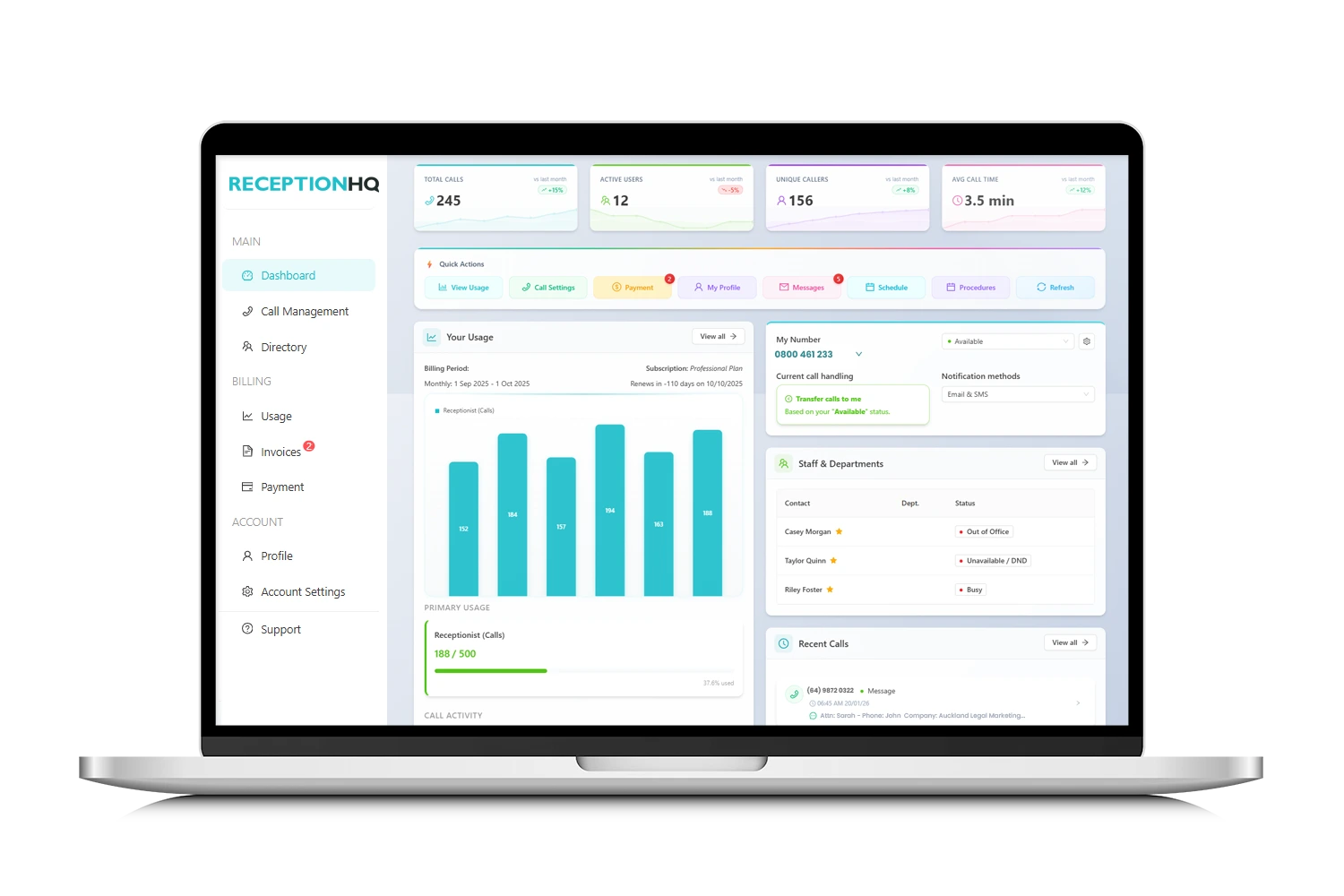
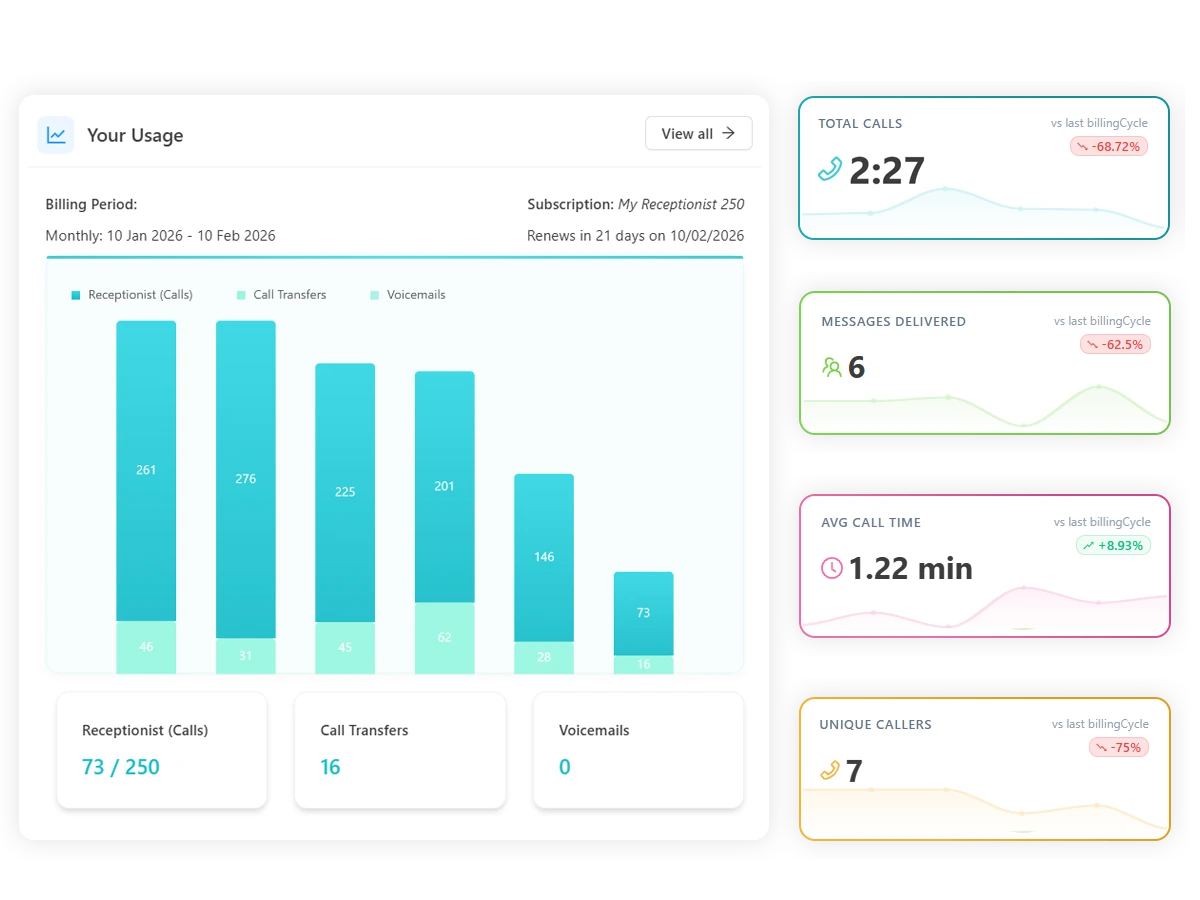
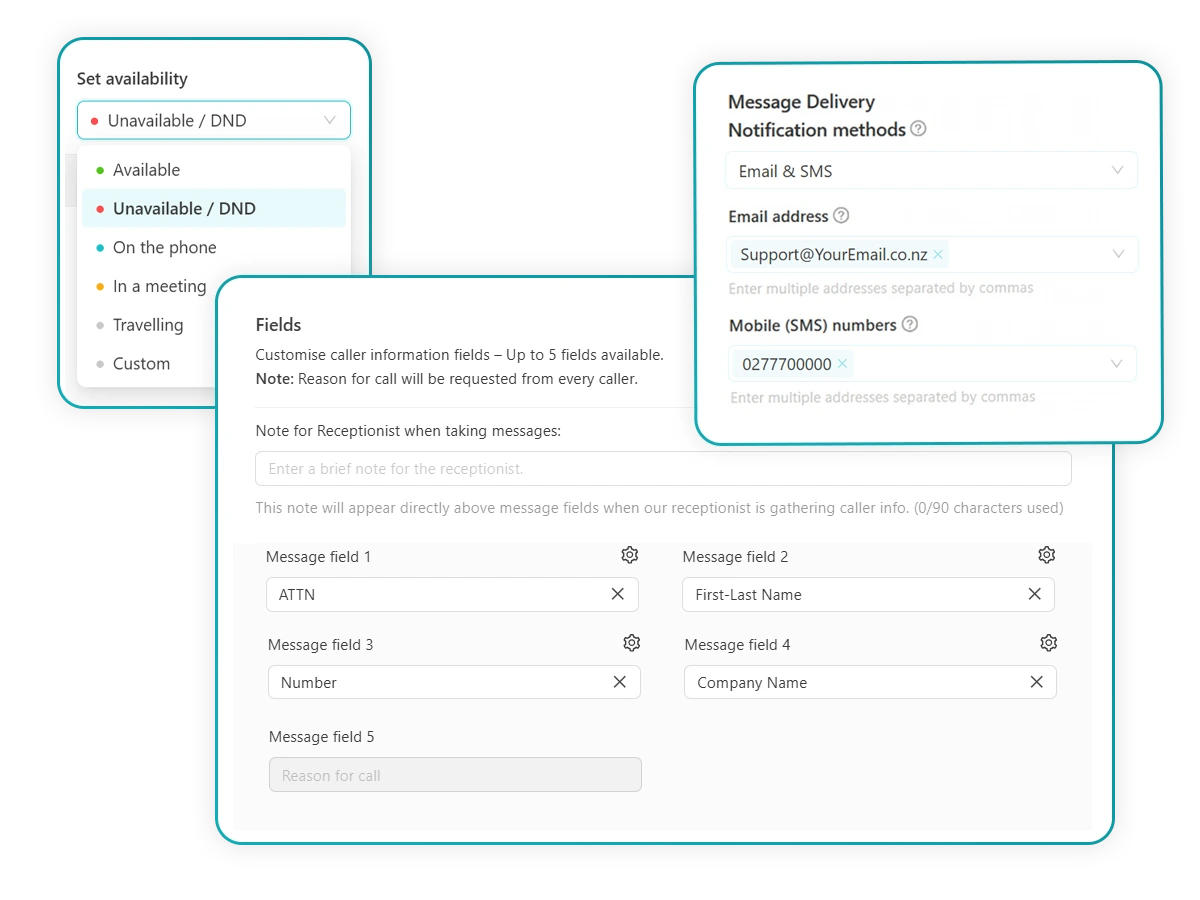
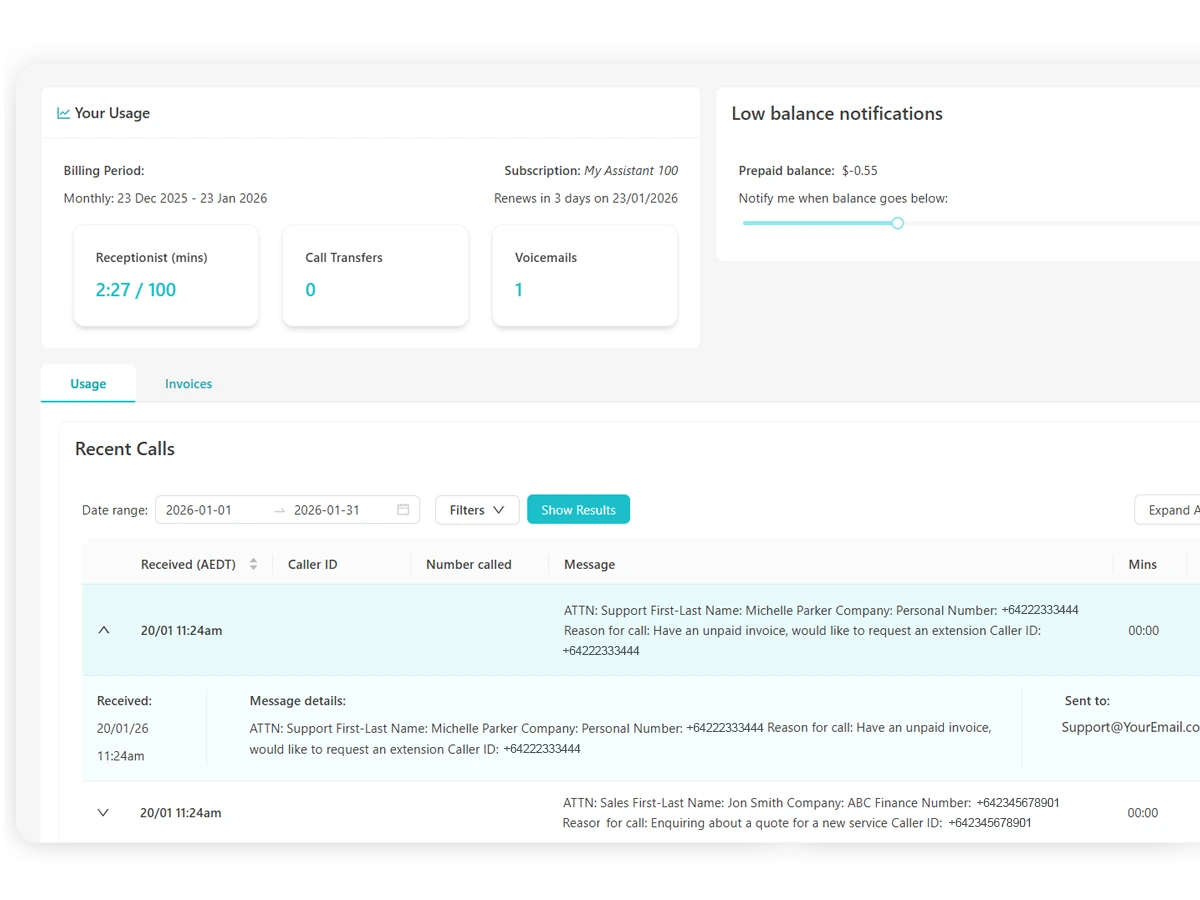
Everything sits in an online portal: your greeting, your call-handling instructions, your team’s contact details and your call history. With ReceptionHQ, you can update your availability or add a new team member in a couple of minutes, no call to support required, and check usage and billing from the same dashboard. It works across desktop and mobile, so updating your after-hours answering before you head out the door takes seconds, not a support ticket.
Access Anywhere
Manage your communications wherever work happens. The portal works seamlessly on your desktop, laptop or mobile so you stay connected in the office or on the move.
- Desktop & mobile compatible
- Accessible from multiple devices
- Multi user access
- Real-time updates
No extra setup or learning curve required.
What’s included, and what usually costs extra
“Virtual receptionist” gets used loosely across the industry, and it’s worth knowing the difference before you compare providers, because plans that look similar on price can cover very different ground.
At the simple end, a service takes messages and forwards them to you. Nothing more. That’s sometimes labelled “message-taking” or “call answering” rather than “virtual reception,” and it’s the right fit if you mainly need to stop calls going to voicemail.
A fuller virtual reception service adds live call transfers to specific people on your team and answers to FAQs about your business without waking you up. A call answering virtual assistant goes further again, following custom call scripts for situations like new client intake, capturing lead details and updating your CRM. For anything urgent, escalation management triages the call and routes it straight to the right on-call person, and if you need calls booked directly into your diary, appointment scheduling handles that separately.
Swipe to compare →
| Capability | Message answering service | Full virtual reception service |
|---|---|---|
| Answer calls in your business name | Yes | Yes |
| Take messages | Yes | Yes |
| Transfer calls to your team | Rarely | Yes |
| Answer FAQs about your business | No | Yes |
| Custom call scripting | No | Yes (some solutions) |
| Escalation management | No | Yes (some solutions) |
| CRM input or form submissions | No | Yes (some solutions) |
| Book appointments | No | Yes (some solutions) |
The takeaway: match the plan to how your business actually runs, not to whichever option is cheapest on the pricing page. A sole trader who just needs someone to stop calls hitting voicemail while they’re on a job doesn’t need appointment scheduling. A medical clinic almost certainly does.
Why so many NZ businesses have switched
Most small NZ businesses don’t have the call volume, or the budget, to justify a dedicated in-house receptionist. But every business loses something when a call goes unanswered, and the reasons owners switch tend to fall into a few consistent categories.
Missed calls tend to become missed customers
People calling a business with a question or a job to give out generally don’t wait around. If nobody picks up, the more common outcome is they call the next name on the list rather than leave a message and hope for a call back. A virtual receptionist means a real person answers, which keeps that first impression intact.
My customers and potential customers have only ever commented favourably on the answer; I don’t think anyone has realised it’s not my own reception.
Tim Richardson, Growpath
The cost gap versus hiring is significant
Careers.govt.nz puts typical receptionist salaries in New Zealand at $49,000 to $65,000 a year. Add 8% annual leave, employer KiwiSaver contributions (3.5% from April 2026), ACC levies and the time it takes to recruit and train someone, and the real cost of an in-house hire is comfortably higher than the headline salary. A virtual reception plan running from under $20 a month up to $60 or so for a fuller service is a fraction of that, even before you factor in that a virtual receptionist doesn’t take sick leave or go on holiday and leave your phones uncovered.
Flex it up or down without touching an employment contract
Ramp up cover for a busy season, switch on after-hours answering for a fortnight while you’re travelling, or scale back when things are quiet. None of that involves recruiting, restructuring or redundancy, which matters more for a five-person business than it might for a larger one with HR resource to spare.
Time zones and after-hours cover
New Zealand does a lot of business with people in different time zones, and plenty of urgent calls (a burst pipe, a lockout, a client overseas) land outside 9-to-5. After-hours answering means those calls get picked up by a live receptionist rather than sitting in voicemail until Monday morning, and for anything genuinely urgent, escalation management can notify your on-call contact directly by phone rather than waiting for you to check messages.
Virtual receptionist vs voicemail vs AI
It’s worth being clear-eyed about the alternatives, because “virtual receptionist” sometimes gets used as a catch-all when the options underneath it behave quite differently.
Voicemail or an answering machine captures a message and nothing else. No greeting in your business name beyond whatever you’ve recorded, no ability to transfer, answer a question or make a judgement call about urgency. It’s free, and it’s also the reason many businesses lose calls in the first place, since a lot of callers simply won’t leave one.
AI phone answering is a newer option that can handle straightforward, predictable interactions around the clock at a lower cost than a live person. It’s improving quickly, but it still tends to struggle with anything that needs judgement, an anxious or upset caller, or a conversation that veers off script.
A live virtual receptionist sits between the two: a trained person who can hold a real conversation, use discretion and build familiarity with repeat callers over time, without the fixed cost of an in-house employee.
Cost vs hiring in-house
Pricing in the NZ market is usually built around a monthly base fee tied to a call allowance, plus a per-call or per-minute rate once you go over it. Message-only plans sit at the low end; full reception with transfers, scripting and diary management sits higher.
Swipe to compare →
| Virtual receptionist | In-house receptionist | |
|---|---|---|
| Typical monthly cost | From ~$19 to $60+ | $4,000–$5,400+ (based on $49k–$65k/yr) |
| Availability | 24/7 if you choose it | Business hours only |
| Sick leave or annual leave cover | Not your problem | Yours to arrange |
| Recruitment and training | Handled by the provider | Yours to manage |
| Scaling up or down | Change your plan | Hire, restructure or make redundant |
| Contract commitment | Usually month-to-month | Employment agreement |
The salary figures above come from careers.govt.nz and don’t include leave loading, KiwiSaver, ACC levies or recruitment costs, so treat the in-house column as a floor rather than a ceiling. It’s also not always either/or. Plenty of businesses run a virtual receptionist alongside in-house staff, using overflow answering to catch calls when the line’s busy, or temporary cover during staff leave, rather than replacing their team outright. See the full pricing breakdown for current plan details.
We used ReceptionHQ while overseas on business for 3 weeks. We found their staff and service to be professional, prompt, simple-to-use, and reasonably priced.
Christie John, Immigranz Ltd
Choosing a provider: the questions
Not every provider delivers the same experience for a similar price, and the gap tends to show up in the details rather than the headline plan.
Is the pricing actually transparent? Look for clarity on what counts toward your call allowance, what happens if you go over it, and whether there are setup or cancellation fees buried in the terms.
Is there a lock-in contract? Some providers require a minimum term. Others run month-to-month with no penalty for leaving. If your call volume is hard to predict, flexibility is worth more than a small discount for committing longer.
Can you trial it before paying? A free trial is the only real way to judge call quality, speed of answer and how accurately messages come through, before you commit. ReceptionHQ offers 7 days, with no credit card required to activate it.
How do they handle busy periods? Ask what happens to overflow when call volume spikes, whether there’s backup capacity, and how consistent quality stays outside normal hours.
Who tends to get the most value from it
Virtual receptionists show up across almost every industry, but they’re most common where a missed call carries a real cost:
- Real estate and property management tenant maintenance calls, after-hours emergencies, buyer enquiries that can’t wait
- Legal practices where a missed call might be a missed new matter
- Healthcare and medical appointment bookings, patient enquiries, cancellations
- Trades and construction calls that come in while someone’s on the tools and can’t answer
- Financial services client volume that spikes hard around tax deadlines
- Tourism, travel and hospitality enquiries from guests or clients across different time zones
Sole traders and very small teams tend to see the clearest impact, simply because there’s no receptionist to fall back on and every unanswered call is a direct loss. See the full range of industries we support for more detail on how the service adapts to different sectors.
Getting started
- Work out roughly how many calls you get and what you actually need handled, then choose a plan (or start with a free trial if you’re not sure yet).
- Set your greeting and call-handling instructions through the provider’s portal.
- Add contact details for anyone who should receive transfers.
- Divert your phone line to the number provided, either full-time, for overflow only, or after hours only.
- Start taking calls.
Most providers can have you live within minutes of signing up, not day
Start a free trial or request a call back if you’d rather talk it through first.